 FX Plugin
Chaoscoming soon...
FX Plugin
Chaoscoming soon...
 Instrument VST
Fractioncreative hardware-based instrument
Instrument VST
Fractioncreative hardware-based instrument
 ExpansionsExplore further expansions for our plugins
Yes. Fraction is a one-time payment and any future updates will be totally free for all registered users.
We continuously update Fraction everytime we can, shaped by what our community needs next!
Every major update adds free presets and sound sources to your growing Library. We also occasionally release optional paid expansions, which are included for free in Fraction Complete Edition.
You can check reviews & guides here:
the first video in the playlist is our official guide.
Fraction overview & reviews here.
Viom regularly posts videos on his YouTube channel showcasing Fraction in action.
+ if you search “Fraction VST” on YouTube, you’ll find plenty of reviews and videos you can watch.
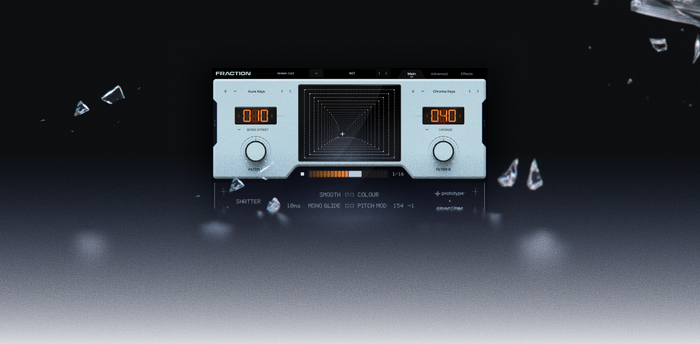
Left and Right (X) blends between sound layer A and B while Up and Down (Y) is split into two sections:
Up and down in the bottom half of the XY Pad, controls the dry and wet of the effects page (0 - 75%).
When you go from the bottom to the top half of the XY Pad, that is where the Filter turns on in the advanced page.
Up and down in the top half of the XY Pad, controls the strength of the LFOs being applied to the Filter.
click here to watch a 120 seconds breakdown of what Fraction can do.
Copy and paste your License Key with no extra spaces at the end.
Find your license key in the “Your Download Is Ready!” email or log into our License Hub
If you got the issue where the plugin asks you to re-enter your license, then follow these steps:
Please try to reinstall fraction after closing it to see if its solves the issue, if not try the following steps:
Try to restart your mac or clear the files located at: '/Users/YOUR NAME/Library/Application Support/Prototype Audio/Fraction'
99% of the time it is about subfolders. Your "Expansions" folder needs to look like this.
1. Download and unzip the 26GB Expansions file (store it anywhere on your computer).
2. Bottom left of the Plugin → Settings → Sample Path, and select the “Expansions” folder inside the Factory Content folder.
Restart the VST.
Important: The folder your locating must be exactly named “Expansions” for them to show up in the preset browser.
The "Expansions" folder is also where any of your new Expansions are going into like Monuments or Core-Synth. But make sure there are no subfolders otherwise it won't show up.
Run the correct installer for your operating system and the Fraction VST file will go to these places:
WIN: C:/Program Files/Common Files/VST3
MAC: C:/Program Files/Common Files/Components
and then make sure your DAW scans these folders (even tho it already does that per default).
The included Factory Expansion contains presets and sounds for Fraction and is required for further expansions.
Minimum required disk space: 52.0 GB You will receive a 26.0 GB zip.file of the Factory Content (that you can delete after zipping) + VST3 and AU installers.
Fraction works in any DAW that supports VST3 or AU formats, including FL Studio, Ableton Live, Logic Pro, Studio One,
Reaper, GarageBand and more...
It works on macOS 10.9+ and Windows 10+
Factory Expansion Content: 24.6 zip.file
→ 51.0GB minimum disk space required during unzipping
click here to visit our support page with the guides to Fraction.
Yes! You can activate Fraction on up to 3 of your own devices per license.
If we detect unusual activity or the license being shared that aren’t recognized as your own devices, it may result in the license being restricted to a single active device.


